
Guide
How to Unlock Map in MIO: Memories in Orbit
Discover how to unlock the map in MIO: Memories in Orbit, so that you can easily navigate through levels and locate hidden areas.


MIO: Memories in Orbit is the new Metroidvania game set in an Ark Spaceship called The Vessel. The progression requires the player to go through numerous areas of the Vessel. It becomes difficult to keep track of the locations as you unlock more areas. On top of that, the game does not offer a map by default, but you can unlock it to make the progression and exploration easier. In this guide, we will tell you how to unlock the map in MIO: Memories in Orbit.
How to Unlock Map in MIO: Memories in Orbit

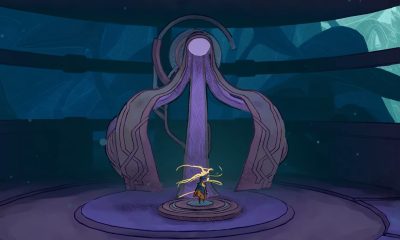
To unlock the map feature in MIO: Memories in Orbit, you must provide Nacre to Shii (NPC). Nacre is the primary currency in MIO: Memories in Orbit that you earn by eliminating enemies. Shii is located in the Workshop, underneath a spine contraption.He is directly above the first overseer waypoint of the game. If you go over to Shii, you will get the option to “Offer your Nacre”.
NOTE: You will have to go past her a few times before the offer nacre option is available.
Now, go to the Apartments level to farm enemies to get Nacre. Return to the Overseer Waypoint to rest and respawn the enemies. Rinse and repeat the enemies until you have 350 Nacre. Once done, go to Shii and give him 200 Nacre. It will unlock the “Look through his eye” option. If you select this option while standing next to Shii, it will open a map. You can navigate through the map, but only while standing next to Shii.

To unlock the map completely so that you can access it anytime, give 150 Nacre to Shii. This will trigger a cutscene, fixing Shii, and unlock the map feature. Now, you will be able to open the map at any time. Once you have the map, you can navigate the levels easily and spot hidden areas for caches and shortcuts.
How to Update Map in MIO: Memories in Orbit

Initially, the map will only show the patterns of the areas you have discovered. If you unlock a new area and venture ahead, the map will not show its patterns. To update the map for all the new levels, you must rest at an Overseer Waypoint. After the rest, the map will update and show you the patterns of all the discovered levels.






Clive Barker’s Hellraiser: Revival Review

Disney Dreamlight Valley: How to Trick or Treat with Villagers


